
Skip to content
daditime logo

DaDiTime

  • Home
  • Laser Marking
    • EzCad FAQs
    • EzCad Manual
  • Laser Cutting

Zero

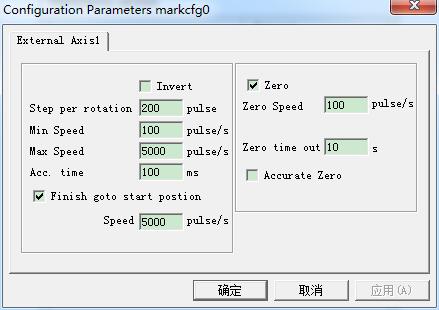
AngleRotate Marking Parameter: Invert, Zero

Laser Menu – AngleRotate Marking Parameter: Invert, Zero

Invert: Reverse the move direction of the expansion axis. Pulses per rotation: The pulse numbers each round that the expansion axis rotating. We can calculate it through…
READ MORE ->

Why Not Returning to Zero After Rotary Marking?

It is necessary to check whether the Zero setting of the software and the Finish goto the start position are checked, and whether the zero signal can still work normally.

Hot Topics

  • File Menu: Recent documents
  • How to Mark Variable Text With the Same Length?
  • The Laser Marking Characters Are Reversed?
  • File Menu – System Parameter: General
  • Edit Menu: Undo Modify/Redo
  • Why Can’t the Expected Marking Depth Be Achieved?
© 2024 DaDiTime.
Privacy Policy · Contact Us