
Skip to content
daditime logo

DaDiTime

  • Home
  • Laser Marking
    • EzCad FAQs
    • EzCad Manual
  • Laser Cutting

UV Laser

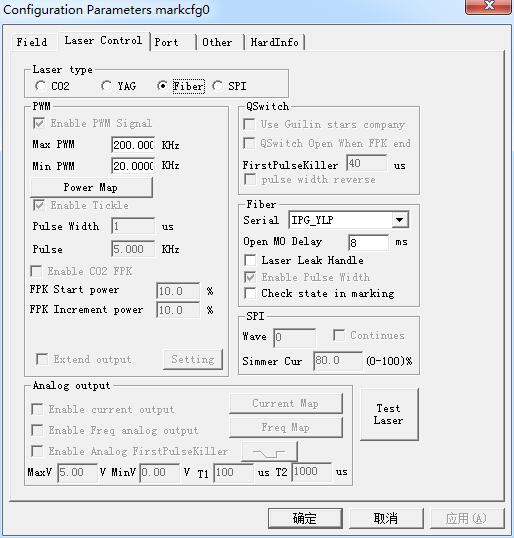
Laser Control Parameter

Param(F3) Configuration: Laser Control

Laser type: Co2: It indicates that current laser size is Co2 laser. YAG: It indicates current laser size is YAG laser. Fiber: It indicates that current laser size is fiber…
READ MORE ->

How Does the Fiber Laser Marker Print White Text and Date on the Packaging Bag?

Fiber laser marker is easy to print black characters, it is best to use UV laser marker for white text. If you use a fiber laser marker, try…
READ MORE ->

Hot Topics

  • System Requirement of MarkingMate 2.7 Installation
  • How to Use a Computer to Control Multiple Lasers for Marking?
  • How to Set the Curved Surface Marking?
  • How to Set Marking Twice by Pressing F2 Once?
  • What is the Reason for Two Effects From One File Marking in Ezcad?
  • Laser to Not Emit Light When Connected to the Board
© 2024 DaDiTime.
Privacy Policy · Contact Us