
Skip to content
daditime logo

DaDiTime

  • Home
  • Laser Marking
    • EzCad FAQs
    • EzCad Manual
  • Laser Cutting

Transformation

Transformation: Mirror

Modify Menu – Transformation: Mirror

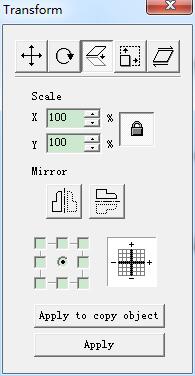
Mirror the current selected object. When select mirror command, a parameter setting box will appear as the Figure shows. Scale: the zoom ratio of the X/Y…
READ MORE ->

Transformation: Mirror

Modify Menu – Transformation: Mirror

Mirror the current selected object. When select mirror command, a parameter setting box will appear as the Figure shows. Scale: the zoom ratio of the X/Y…
READ MORE ->

Hot Topics

  • Why Does the Laser Marking Machine Foot Switch Not Work?
  • Draw Menu: Curve
  • Edit Menu: Combine / Uncombine
  • How to Stop Marking Using the External Input Port?
  • Application of Laser Cutting for Sponge Tube
  • Draw Menu: Text – Text Font Parameters
© 2024 DaDiTime.
Privacy Policy · Contact Us