
Skip to content
daditime logo

DaDiTime

  • Home
  • Laser Marking
    • EzCad FAQs
    • EzCad Manual
  • Laser Cutting

Rectangle

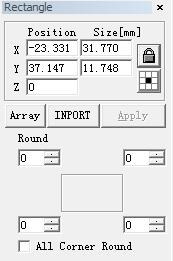
Draw Menu: Rectangle

Draw Menu: Rectangle

To draw a rectangle, users can select command “Rectangle” in Draw Menu or click the icon. Under the command “Rectangle”, users can press the left…
READ MORE ->

Hot Topics

  • Why Is the Laser Power Reduced?
  • Ezcad2 Will Stop Working When Opening the Plt Format File
  • Under What Circumstances Should the Output Power of the Laser Cutting Machine Be Increased?
  • File Menu – System Parameter: Move rotate
  • There Is a Problem of Content Distortion When Using Flying Marking?
  • How to Use a Computer to Control Multiple Lasers for Marking?
© 2024 DaDiTime.
Privacy Policy · Contact Us