
Skip to content
daditime logo

DaDiTime

  • Home
  • Laser Marking
    • EzCad FAQs
    • EzCad Manual
  • Laser Cutting

Mouse Dragging

keyboard movement

How to Set the Mouse Move Distance Smaller in Ezcad?

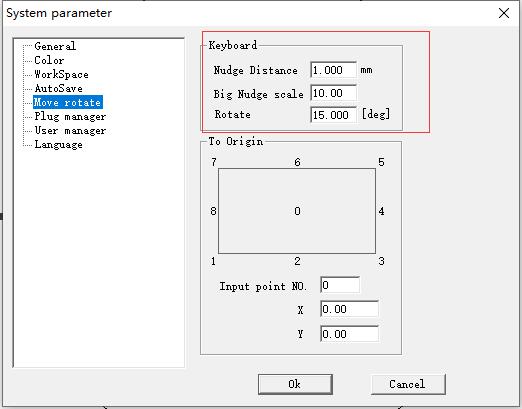
This distance of mouse dragging is not fixed. If it is a keyboard movement, the distance can be set in the System parameter – Move rotate.

Hot Topics

  • File Menu: Object Property
  • Lines Are Not Straight When Marking the Grid?
  • Why is the Current of the Laser Marking Machine Unstable?
  • Application of Laser Cutting for Carbon Fiber Composite Material
  • EzCad3: How to Make 3D XYZ Correction?
  • There Is a Temperature Alarm?
© 2024 DaDiTime.
Privacy Policy · Contact Us