Skip to content
daditime logo

DaDiTime

  • Home
  • Laser Marking
    • EzCad FAQs
    • EzCad Manual
  • Laser Cutting

Jump Delay

Ezcad2 jump delay

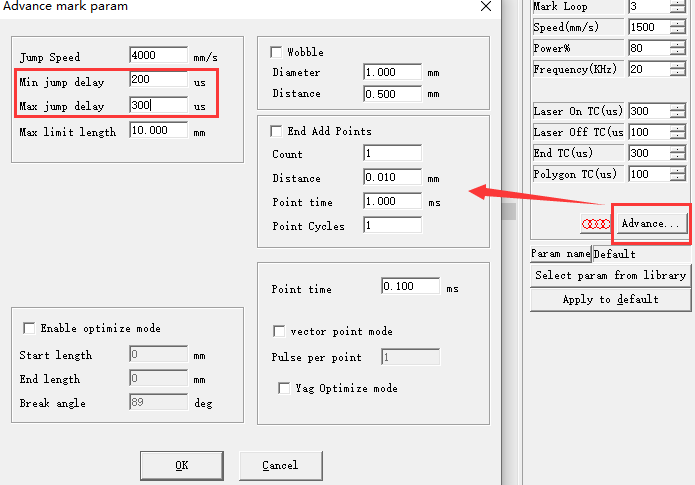
Why Are There So Many Small Dots Marked?

You can have a try: In Ezcad2, click Advance mark param, then adjust Min jump delay to 200, and Max jump delay to 300.

Hot Topics

  • Draw Menu: Rect
  • Draw Menu: Point(D)
  • Modify Menu: Plastic
  • Application of Laser Cutting for TFT LCD Screen
  • Edit Menu: Hatch
  • How to Set the Mouse Move Distance Smaller in Ezcad?
© 2024 DaDiTime.
Privacy Policy · Contact Us