
Skip to content
daditime logo

DaDiTime

  • Home
  • Laser Marking
    • EzCad FAQs
    • EzCad Manual
  • Laser Cutting

Cylinder Marking

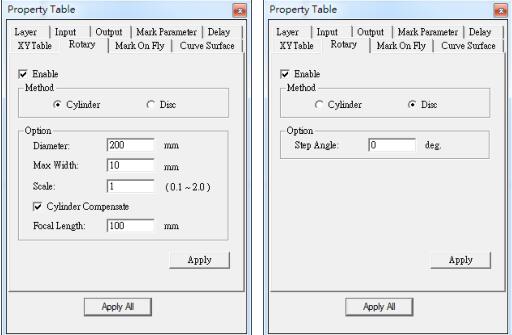
Cylinder Mode and Disc Mode

How to Use the Function of Rotary Marking?

Enable Rotary Marking To control the Rotary Axis, users need activate the Rotary function by clicking the Layer object in Object Browser and then go to the Rotary…
READ MORE ->

Hot Topics

  • Where is the Small Laser Marking Machine Generally Used?
  • How to Solve the Unclear Marking of CO2 Laser Marker?
  • Why Are There Few Fonts in the EzCad2?
  • Modify Menu: Distribution
  • Hardware and System Requirements for EzCad3 Installation and Operation
  • View Menu: Zoom
© 2024 DaDiTime.
Privacy Policy · Contact Us